The 'organization'
An organization is the main workspace for your company or team in FTE Tree. A user may belong to more than one organization, but data is kept separate between organizations. If you have a complex structure, FTE Tree's department tree can support the way your teams, locations, or cost centers are organized.
Organization owner
The organization owner is the person who sets up the original account. Please contact us if the organization's owner ever needs to be changed or their permissions otherwise limited.
The owner is given full administrative rights and permission to view everything in the organization and can't be edited by any other user in the organization by default. Please contact us with any questions or needed changes to this user.
Users in your organization
Within FTE Tree, each person has their own user account and can be given access to one or more organizations.
User access is managed separately for each organization. A user can use one login for multiple organizations, but their permissions and data access in one organization do not carry over to another. The chart below shows how User 3 may be a member of both Organization A and Organization B.
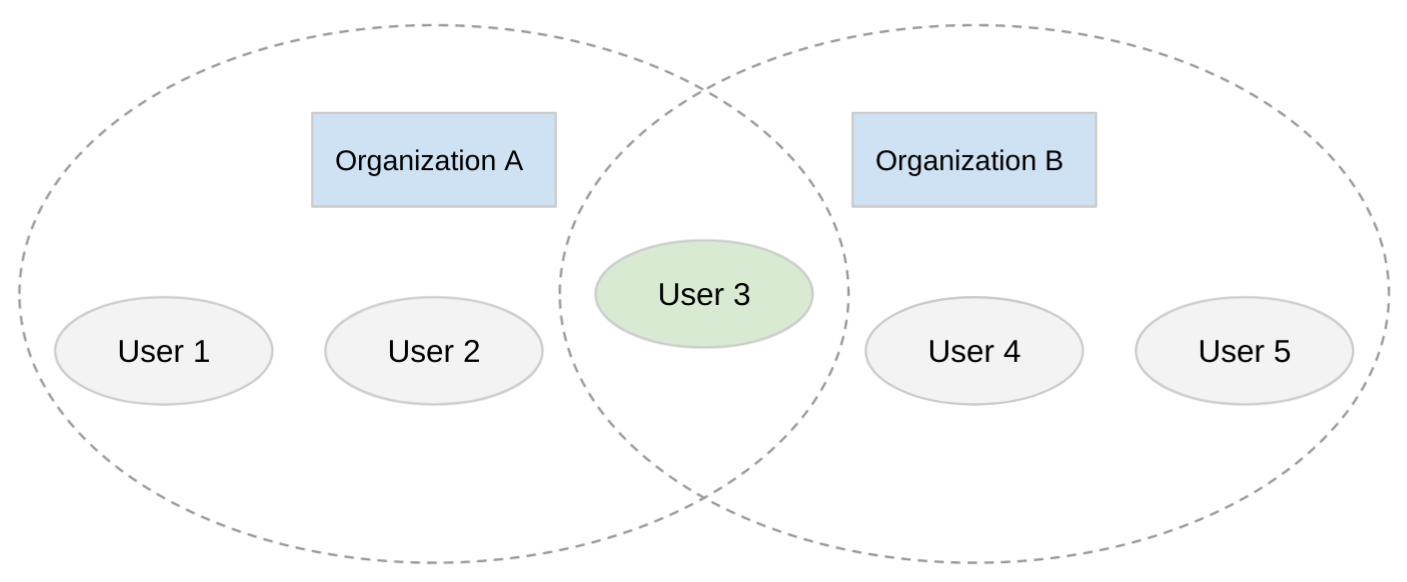
While you can see that User 3 has access to both organizations, User 1 and User 2 only have access to Organization A, and User 4 and User 5 only have access to Organization B. At any time, you may remove User 3's permission from Organization A, and they will no longer be able to access any of your data from Organization A. However, they will still be able to access data from Organization B.
Important: Although a user may be part of multiple organizations, there is never any information or data shared between them. The user must open the other organization's workspace. All user permissions are tied to the organization, not the user's account.
After you create an account, your organization's administrators may limit allowed email domains and require two-factor authentication to further protect your information.
Organization address and separation
Each organization in FTE Tree is assigned its own unique FTE Tree address. For example, if your organization is named "Acme Corp," your account may be accessible at a URL like acmecorp.ftetree.com. This address is exclusive to your organization and serves as the entry point for your users.
This provides several important benefits:
-
Clear identity: Your organization's URL is unique and easily recognizable to your team.
-
Access checks: Users who are not members of your organization cannot access your organization workspace.
-
Separate workspace sessions: When users open an organization, FTE Tree creates a protected workspace session for that organization's address.
When a user belongs to multiple organizations, they select which organization to access and are directed to that organization's FTE Tree address. There is no cross-organization access within a single workspace session. A user may have two organizations open in different tabs, but each tab is authorized against that organization's own session, permissions, and security requirements.
Data separation and security
FTE Tree enforces strict data separation between organizations:
-
Organization-level data separation: Data stored in FTE Tree, including departments, positions, employees, approval workflows, and reports, is associated with your organization so it is not visible to other organizations.
-
Organization-specific permissions: A user's roles and access in one organization do not affect their access in another. Removing a user from your organization revokes their access to your data.
-
Organization-specific authentication: One organization may allow a standard account sign-in while another may require MFA, Microsoft sign-in, Google sign-in, or enterprise SSO. Each organization checks its own requirements before showing data.
-
Encrypted in transit and at rest: All data transmitted between your browser and FTE Tree is encrypted using HTTPS. Data stored on our servers, including uploaded files, is also encrypted at rest.
-
Subscription validation: Access to your organization requires a valid, active subscription. If a subscription lapses, access to the organization's data is restricted until the subscription is renewed.
These layers of protection work together to ensure that your organization's data remains private, secure, and completely separate from any other organization using FTE Tree. For more details on authentication features such as multi-factor authentication and single sign-on, see Authentication and security.